


Zipic for Mac
- Paid
- 4.2
- V1.10.6
Download for Mac
View an ad to download for free

- 5KM Tech LLC
AI-ready image compression for Mac & Windows
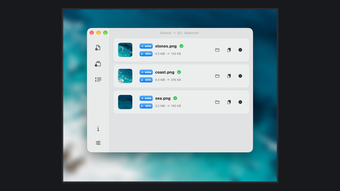
Zipic is a native image compressor and converter for macOS, built for people who want image work finished without uploading files. It also exposes that same local pipeline to AI agents. Install the Zipic skill, then ask Claude Code or Codex to "compress these screenshots" or "convert this folder to WebP." The skill calls the zipic CLI, which returns structured JSON, per-file results and exit codes the agent can read.
Core features
- AI agent workflow through the Zipic skill and zipic CLI
- JSON results, meaningful exit codes and --dry-run previews
- Batch compress JPEG, PNG, WebP, HEIC, AVIF, JPEG XL, TIFF, GIF, SVG and APNG
- Convert formats, resize images and strip EXIF metadata
- Export PDF pages as images at 72, 150 or 300 DPI (Pro)
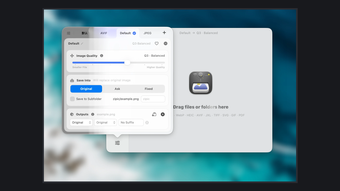
- Target file size, six compression levels and reusable presets
- Side-by-side before-and-after preview at identical resolution
- Folder monitoring, clipboard auto-compress, Finder menu, Notch Drop, Shortcuts and Raycast
Local by design
Zipic uses native macOS APIs and supports Apple Silicon and Intel Macs. The menu bar app stays out of the way until you drag files in, right-click in Finder or let folder monitoring pick up new files. No account is required and image processing works offline.
Install the AI skill with: npx skills add okooo5km/Skills4U --skill zipic
Pricing
The free tier includes a 7-day Pro trial, then 25 images per day with basic formats. Pro is a one-time purchase with lifetime updates.
Loading…

App specs
Developer
- 5KM Tech LLC
License
Full
Version
1.10.6
Latest update
Platform
Mac
Language
English
Size
29.55 MB
Zipic for Mac
- Paid
- 4.2
- V1.10.6
Download for Mac
View an ad to download for free
User reviews about Zipic
Have you tried Zipic? Be the first to leave your opinion!
Add reviewTop downloads Productivity for Mac

Microsoft Word
A free tool that empowers your productivity

Microsoft PowerPoint
Presentation control for clear slide narratives
Microsoft Excel
Structured spreadsheets for serious data work
LibreOffice
Comprehensive Free Office Suite for Mac

Microsoft Remote Desktop
Download Microsoft Remote Desktop for Mac: Secure access anywhere
Top downloads Productivity for Mac
Microsoft Word
A free tool that empowers your productivity
Microsoft Excel
Structured spreadsheets for serious data work
Microsoft PowerPoint
Presentation control for clear slide narratives

VM Horizon Client
Redefining the boundaries of enterprise cloud solutions
LibreOffice
Comprehensive Free Office Suite for Mac
Top downloads Productivity for Mac
Microsoft Word
A free tool that empowers your productivity
Microsoft Excel
Structured spreadsheets for serious data work
Microsoft PowerPoint
Presentation control for clear slide narratives

Microsoft Office 2016
Download Microsoft Office for Mac: Word, PowerPoint, and more
Microsoft Remote Desktop
Download Microsoft Remote Desktop for Mac: Secure access anywhere
Latest articles

Fortnite reveals Pirate Shop Access odds after backlash: 1 in 137,500

Stellar Blade Complete Edition is out on Switch 2: Digital Foundry says it’s better than expected

GTA 6 on PS5 could unlock early in New Zealand: play up to 13 hours ahead

Clockwork Revolution now targets 2027: the BioShock comparison is real

The Rings of Power season 3 forges the One Ring at last: Prime Video planned it for years
Laws concerning the use of this software vary from country to country. We do not encourage or condone the use of this program if it is in violation of these laws. Softonic may receive a referral fee if you click or buy any of the products featured here.